ShopDreamUp AI ArtDreamUp
Deviation Actions


Suggested Deviants


Suggested Collections


You Might Like…


![[NEW Concept] Windows ONE - Desktop](https://images-wixmp-ed30a86b8c4ca887773594c2.wixmp.com/f/4fc6b8ae-702c-4f4c-9983-b9126ecca48e/d7mqouo-75228049-549d-4afd-8785-38b4752d5a62.png/v1/crop/w_184,h_184,x_36,y_0,scl_0.17037037037037,q_70,strp/_new_concept__windows_one___desktop_by_danielskrzypon_d7mqouo-92s-2x.jpg?token=eyJ0eXAiOiJKV1QiLCJhbGciOiJIUzI1NiJ9.eyJzdWIiOiJ1cm46YXBwOjdlMGQxODg5ODIyNjQzNzNhNWYwZDQxNWVhMGQyNmUwIiwiaXNzIjoidXJuOmFwcDo3ZTBkMTg4OTgyMjY0MzczYTVmMGQ0MTVlYTBkMjZlMCIsIm9iaiI6W1t7ImhlaWdodCI6Ijw9MTA4MCIsInBhdGgiOiJcL2ZcLzRmYzZiOGFlLTcwMmMtNGY0Yy05OTgzLWI5MTI2ZWNjYTQ4ZVwvZDdtcW91by03NTIyODA0OS01NDlkLTRhZmQtODc4NS0zOGI0NzUyZDVhNjIucG5nIiwid2lkdGgiOiI8PTE5MjAifV1dLCJhdWQiOlsidXJuOnNlcnZpY2U6aW1hZ2Uub3BlcmF0aW9ucyJdfQ.frl_JIyDWsum3vkbu7pmEEe1LJFdK06iu5MGASIApAM)
![[NEW Concept] Windows ONE - Desktop](https://images-wixmp-ed30a86b8c4ca887773594c2.wixmp.com/f/4fc6b8ae-702c-4f4c-9983-b9126ecca48e/d7mqouo-75228049-549d-4afd-8785-38b4752d5a62.png/v1/crop/w_92,h_92,x_18,y_0,scl_0.085185185185185,q_70,strp/_new_concept__windows_one___desktop_by_danielskrzypon_d7mqouo-92s.jpg?token=eyJ0eXAiOiJKV1QiLCJhbGciOiJIUzI1NiJ9.eyJzdWIiOiJ1cm46YXBwOjdlMGQxODg5ODIyNjQzNzNhNWYwZDQxNWVhMGQyNmUwIiwiaXNzIjoidXJuOmFwcDo3ZTBkMTg4OTgyMjY0MzczYTVmMGQ0MTVlYTBkMjZlMCIsIm9iaiI6W1t7ImhlaWdodCI6Ijw9MTA4MCIsInBhdGgiOiJcL2ZcLzRmYzZiOGFlLTcwMmMtNGY0Yy05OTgzLWI5MTI2ZWNjYTQ4ZVwvZDdtcW91by03NTIyODA0OS01NDlkLTRhZmQtODc4NS0zOGI0NzUyZDVhNjIucG5nIiwid2lkdGgiOiI8PTE5MjAifV1dLCJhdWQiOlsidXJuOnNlcnZpY2U6aW1hZ2Uub3BlcmF0aW9ucyJdfQ.frl_JIyDWsum3vkbu7pmEEe1LJFdK06iu5MGASIApAM)


Featured in Groups



Description
Hi,
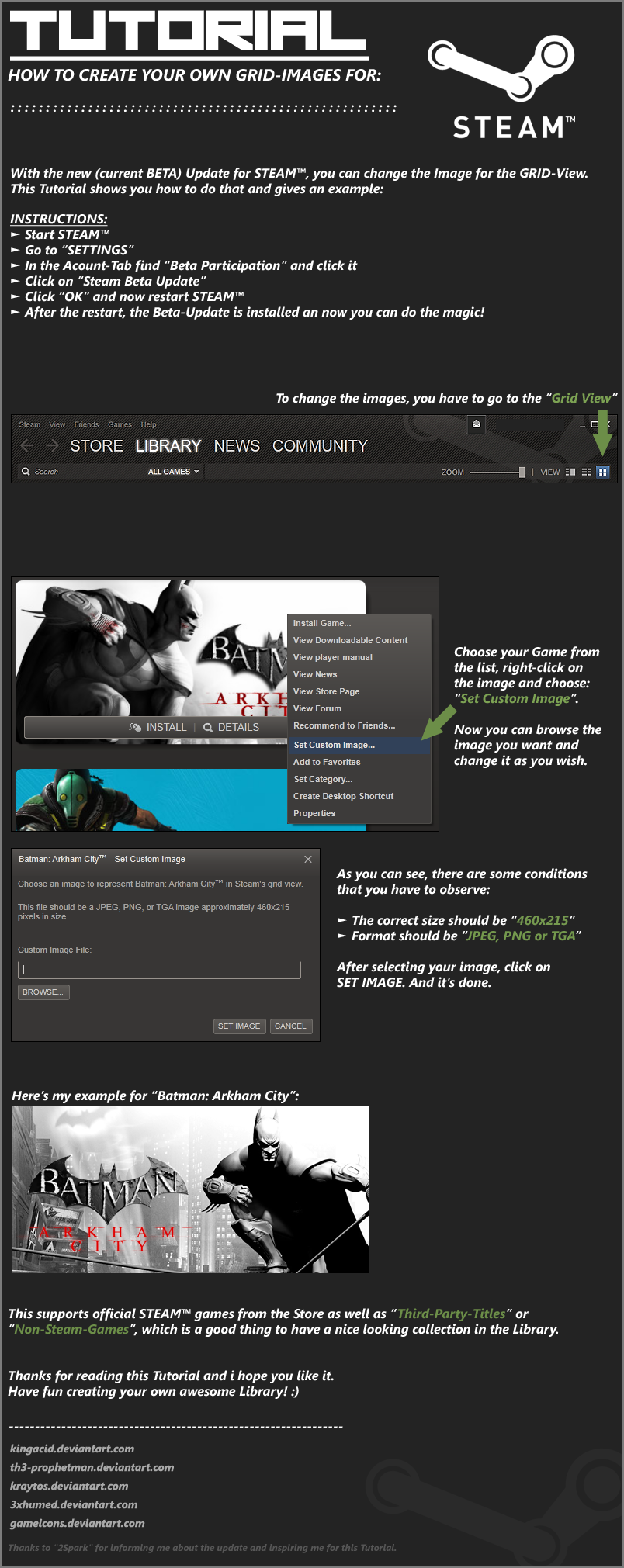
here's my (i guess first) Tutorial
This shows you how you can change the Images in the GRID-View of STEAM to create you own awesome Library.
Links you might wanna visit for this Tutorial:
Official STEAM- Forum (Collection of custom Images):
[link]
NeoGAF-Forum (Collection of custom Images):
[link]
Another Collection of custom Images:
[link]
Hope you like it ;D
Thanks goes to

[link]
for informing me about the update and inspiring me for this Tutorial.
here's my (i guess first) Tutorial
This shows you how you can change the Images in the GRID-View of STEAM to create you own awesome Library.
Links you might wanna visit for this Tutorial:
Official STEAM- Forum (Collection of custom Images):
[link]
NeoGAF-Forum (Collection of custom Images):
[link]
Another Collection of custom Images:
[link]
Hope you like it ;D
Thanks goes to
[link]
for informing me about the update and inspiring me for this Tutorial.
Image size
804x2021px 556.48 KB
Comments12
Join the community to add your comment. Already a deviant? Log In

wow i didn't know that. thanks for the tutorial!